
Chapter 3: Computers That Talk
Computers That Talk 🌐
Section titled “Computers That Talk 🌐”How does the internet get to your screen?
So far, we have explored one computer at a time: its inputs and outputs, its brain, its workbench, and its toy box. But computers almost never work alone. When you watch a video, play an online game, or video-chat with a cousin, your device is talking to other computers, sometimes on the other side of the world.
How can a message cross an ocean in less than a second? How does a video find its way to your tablet and not your neighbor’s? And where exactly is “the cloud”?
In this chapter, we will learn what a network is, meet the box in your home that shares the internet, follow a web page as it is chopped into pieces and rebuilt on your screen, and discover what the cloud and backups really are. Spoiler: the cloud is not in the sky!
3.1 — What a Network Is 🤝
Section titled “3.1 — What a Network Is 🤝”Imagine drawing an amazing picture that nobody else could ever see. No showing friends, no hanging it on the fridge. A computer that is not connected to anything is a little like that. It can only use what is inside its own case.
Sharing Is the Point
Section titled “Sharing Is the Point”A networknetwork: Two or more computers connected together so they can share information. fixes that. A network is computers connected together so they can share: messages, pictures, games, music, printers, and more. Sending and receiving information between connected devices is what networks are for.
Your classroom works like a network. You pass papers to each other, you share one pencil sharpener, and you listen when someone shares news with the whole class. A school computer lab works the same way, with twenty computers all sharing one printer and one internet connection.
Small, Big, and the Biggest
Section titled “Small, Big, and the Biggest”Networks come in different sizes:
- Small networks connect the devices in one home or one classroom.
- Big networks connect every computer in a whole school district or office building.
- The biggest network of all is the internetinternet: The giant worldwide network that connects millions of smaller networks together.. The internet is millions of networks all connected to each other, wrapping around the planet.
Picture your home network as your street. The internet is every street, highway, and bridge on Earth, all connected. Much of it runs through cables buried under roads and even laid across the bottom of the ocean. Because the roads connect, a message from your tablet can reach another country in less than a second.
The internet changed the world. People can video-chat with family far away, students can visit museum websites from their classroom, and doctors can share X-rays with experts in other cities.
Wired or Wireless?
Section titled “Wired or Wireless?”Devices join a network in two main ways. A wired connection uses a cable, often called an Ethernet cable, plugged into a port. Wired connections are steady and fast, which is why many desktops and game consoles use them. A wireless connection uses invisible radio signals, so you can carry your tablet anywhere in the house. Wireless gives you freedom. Wired gives you steadiness. Many homes and schools use both.
3.2 — The Router, Wi-Fi, and Addresses 📶
Section titled “3.2 — The Router, Wi-Fi, and Addresses 📶”Somewhere in your home, maybe on a shelf or behind the TV, sits a small box with blinking lights. Most people walk past it every day without a glance, but it is the hero of your home network.
The Mail Carrier of Your Home
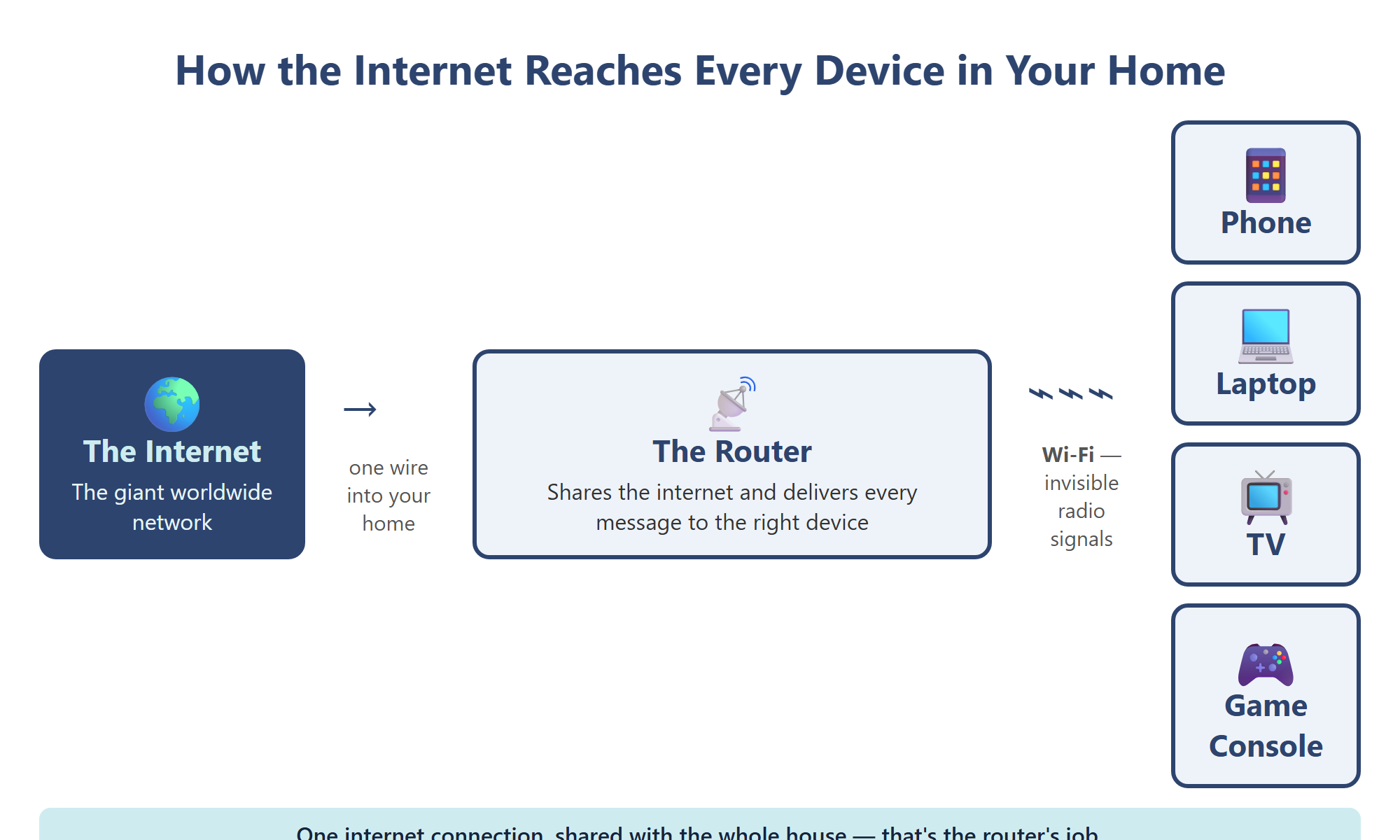
Section titled “The Mail Carrier of Your Home”That box is a routerrouter: The box that shares one internet connection with all the devices in a home or building and sends each message to the right device.. The internet arrives at your home through one connection, but your family might have phones, tablets, laptops, a TV, and a game console all wanting internet at the same time. The router is like a mail carrier for your house. Every message coming in gets delivered to exactly the right device, and every message going out gets sent on its way. Video to the TV, game moves to the console, a message to Mom’s phone: the router keeps them all sorted.
Wi-Fi: Radio You Can’t See
Section titled “Wi-Fi: Radio You Can’t See”Most tablets and phones have no cable plugged in. They connect with Wi-FiWi-Fi: Invisible radio signals that carry network information between a router and nearby devices, with no wires needed., invisible radio signals that carry information between the router and your devices. Wi-Fi signals are a kind of radio wave, like the ones a car radio picks up.
Wi-Fi only reaches so far. Walk too far from the router and the signal gets weak, like a friend’s voice fading as they walk away. Walls, floors, and big metal objects weaken it too, which is why videos sometimes stutter in a far-away bedroom.
Every Device Has an Address
Section titled “Every Device Has an Address”How does the router know which device is which? Every device on a network gets an IP addressIP address: A number that names a device on a network, like a home address, so information can be delivered to the right place., a number that works like a home address. An IP address can look like 192.168.1.25. When a video arrives, it is labeled with your tablet’s address, so the router delivers it to your tablet and not to your brother’s game console.
3.3 — Packets: The Journey of a Web Page 🚀
Section titled “3.3 — Packets: The Journey of a Web Page 🚀”You tap a video and it starts playing in about a second. In that single second, one of the fastest deliveries on Earth takes place. Let’s slow it down.
Meet the Server
Section titled “Meet the Server”Web pages and videos do not appear from nowhere. They are kept on a serverserver: A powerful computer whose job is to store web pages, videos, games, and files and send them to other computers that ask., a powerful computer whose job is serving things to other computers that ask. Like a waiter in a restaurant, a server waits for orders and delivers exactly what was requested, day and night.
Broken into Packets
Section titled “Broken into Packets”A big video is too large to send in one piece. So the server chops it into thousands of small pieces called packetspackets: Small pieces of information sent across a network. Each one is labeled with where it is going and its place in line, so the pieces can be put back together.. Each packet is labeled like an envelope: where it is going, where it came from, and its number in line, such as “piece 12 of 900.”
The packets don’t all travel together. Some may take one road across the internet and some may take another, a bit like a class taking different hallways to the gym. They can even arrive out of order. When they reach your device, it reads the numbers and snaps the pieces back together in the right order. If a piece goes missing, your device notices the gap and asks for that piece again.
All of this works because every computer follows the same rules for sending and receiving. Rules like these are called protocols. They are like the rules of the road that let cars from every town share the same highways.
Five Steps in Under a Second
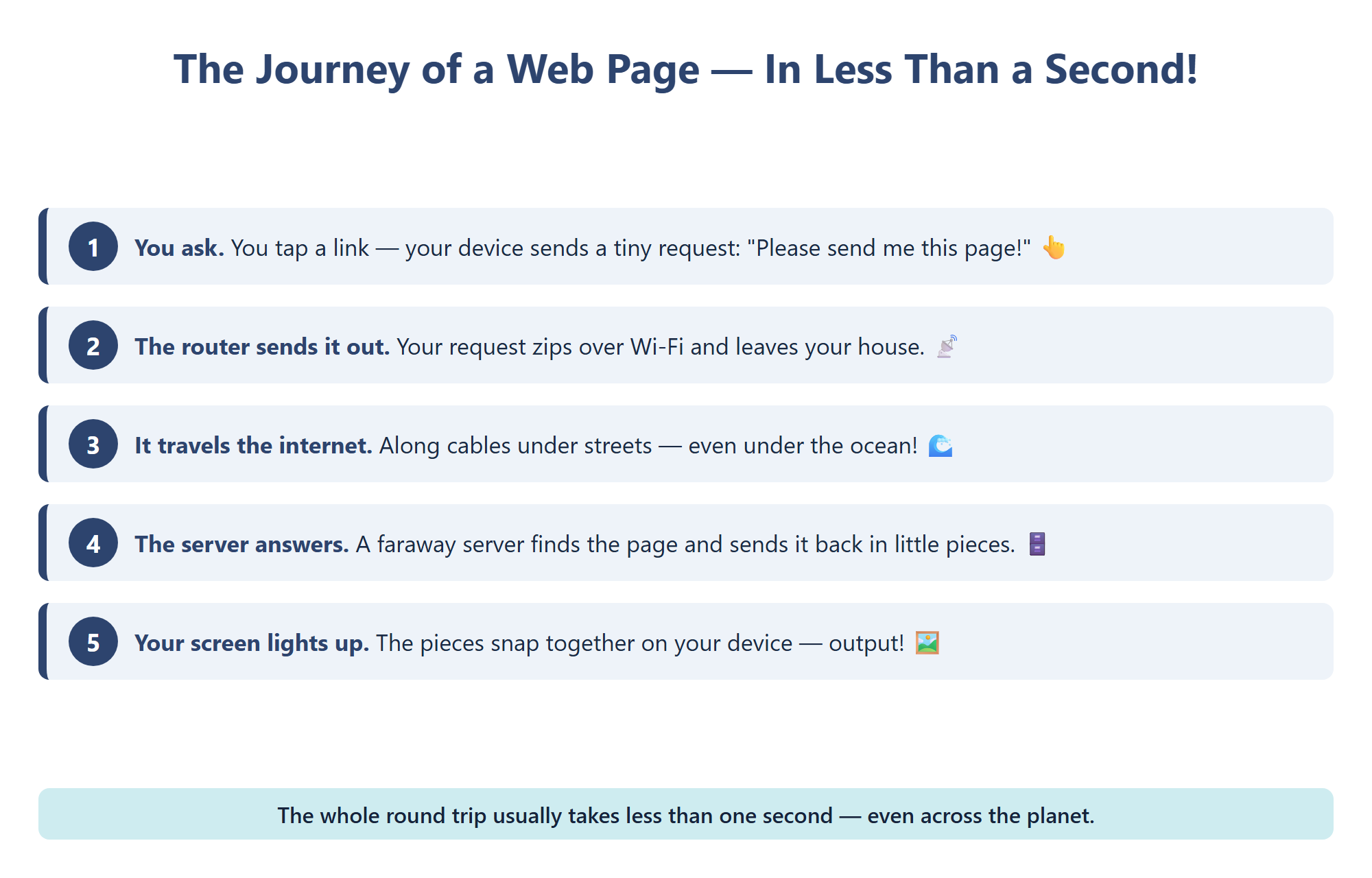
Section titled “Five Steps in Under a Second”- You ask. You tap a link. Your device writes a tiny message: “Please send me this page!”
- Your router sends it out. The request goes over Wi-Fi to the router, which passes it onto the internet.
- The request travels. It hops along the internet’s roads, through cables under streets and oceans, until it reaches the right server.
- The server answers in packets. The server sends the page back in many small, labeled packets.
- Your device rebuilds it. The packets arrive, snap together in order, and your screen lights up. Output!
3.4 — The Cloud and Backups ☁️
Section titled “3.4 — The Cloud and Backups ☁️”Grown-ups say it all the time: “The photos are in the cloud.” It sounds like your pictures are floating above your house. Here is one of the biggest secrets in this book: there are no computer files in the sky.
Someone Else’s Computer
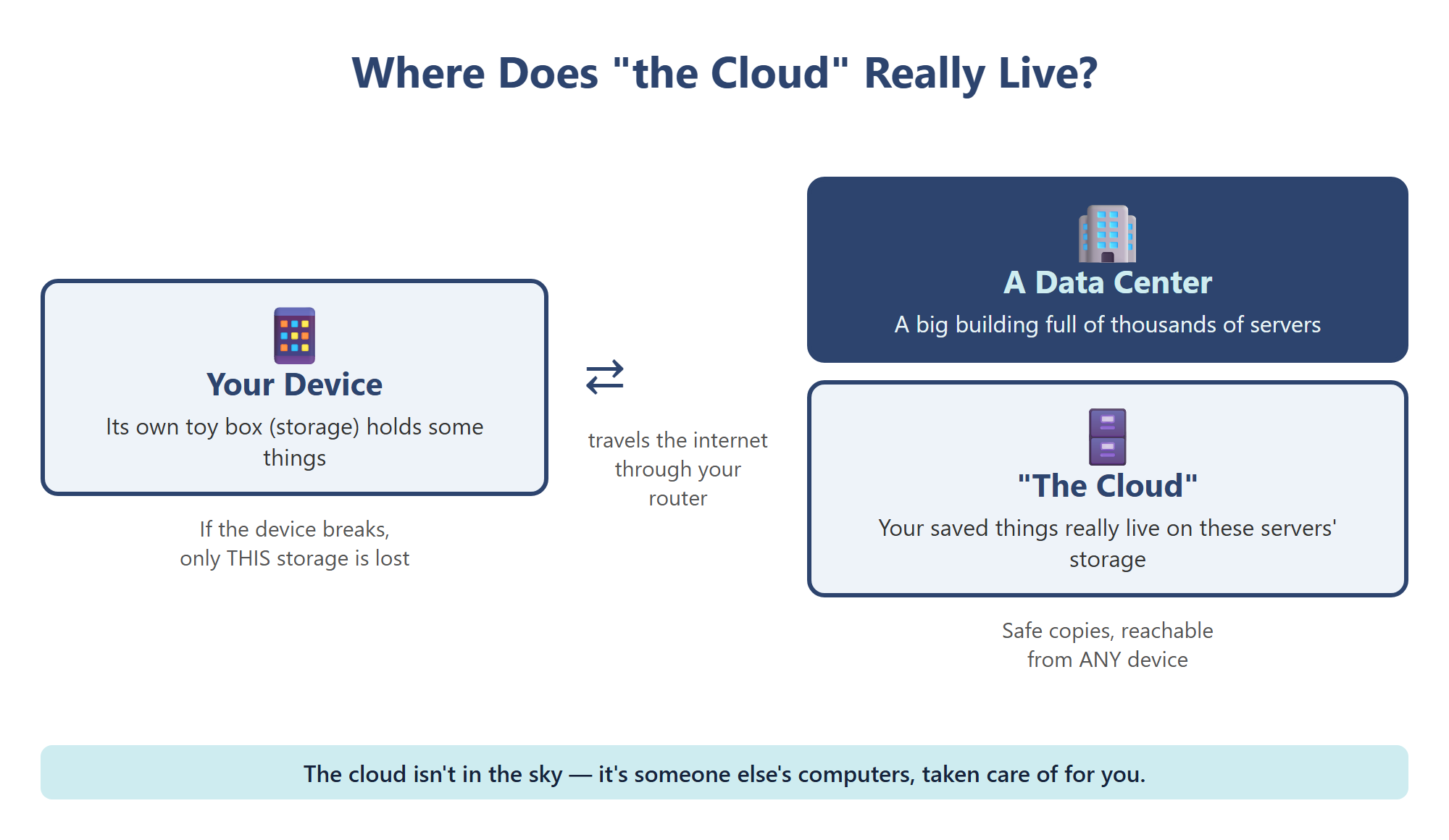
Section titled “Someone Else’s Computer”The cloudcloud: Storing and using files and programs on servers far away, which you reach over the internet from any device. is really someone else’s computers. Companies build huge buildings called data centers, filled with thousands of servers in long rows. When you save to the cloud, your file travels across the internet as packets and lands in the storage of a server in one of those buildings. The cloud is just storage, the toy box from Chapter 2, that lives far away instead of inside your device.
Why People Use the Cloud
Section titled “Why People Use the Cloud”- Reach your work from anywhere. Start a story on a school laptop and finish it on another device, because it isn’t trapped in one machine.
- Share and work together. Classmates can work in the same shared document at the same time.
- Save space. Your device’s own toy box stays less stuffed.
Backups: A Second Copy
Section titled “Backups: A Second Copy”A backupbackup: An extra copy of your files kept in a different place, so they can be brought back if the first copy is lost or broken. is an extra copy of your files kept in a different place. Devices get dropped, lost, or splashed. If your only copy of a photo lived on a tablet that fell in the pool, that photo is gone. If a backup lives in the cloud or on a separate drive, you can bring it back. That is why families and schools back up important files regularly.
The cloud is safest when you use it carefully:
- Use only the cloud apps your school or family has approved.
- Keep your account password secret, so only you can open your files.
- Ask a grown-up before sharing a link to a file, and share only with people you know.
Chapter 3 Activity: The Packet Relay 📦
Section titled “Chapter 3 Activity: The Packet Relay 📦”Your Mission: Become a network and deliver a message as packets, using only paper.
Part 1: Chop the Message
Section titled “Part 1: Chop the Message”In a small group, write a short message on a paper strip, like “THE ROUTER IS OUR MAIL CARRIER.” Cut it into six pieces. On each piece, write the to address (another group’s name), the from address (your group’s name), and its number, like “3 of 6.”
Part 2: Send Them Different Ways
Section titled “Part 2: Send Them Different Ways”Hand your packets to “routers,” classmates standing in different spots around the room. Each router passes packets along until they reach the right group. Send some packets the long way around on purpose so they arrive out of order. Your teacher may “lose” one packet!
Part 3: Rebuild and Check
Section titled “Part 3: Rebuild and Check”The receiving group sorts the packets by number and rebuilds the message. Is a piece missing? Write a note asking for that number again. Then draw a comic of your packet’s journey and label it with at least four words from this chapter: network, router, Wi-Fi, IP address, server, packets, cloud, backup.
Key Concepts Checklist
Section titled “Key Concepts Checklist”- I can explain that a network is computers connected so they can share
- I know the internet is the giant network that connects networks around the world
- I can compare wired and wireless connections
- I can explain what a router does and why Wi-Fi gets weak far away
- I know an IP address works like a home address for a device
- I can explain how information is broken into packets, sent, and put back together
- I can explain that the cloud is storage on servers in data centers
- I know why backups matter and how to use the cloud safely