
Chapter 5: Be a Fix-It Detective
Be a Fix-It Detective 🕵️
Section titled “Be a Fix-It Detective 🕵️”Troubleshooting is solving a mystery, step by step.
The screen freezes. The video won’t load. The tablet won’t turn on. It can feel like the device broke on purpose, just to ruin your day. But professional computer helpers know a secret: almost every “broken” computer is really a mystery waiting to be solved, and mysteries have steps.
Everything you have learned in this book is a clue. You know about inputs, outputs, and ports. You know the workbench clears when the power goes off. You know the router shares the internet and the battery feeds the parts. Now you get to use all of it.
In this chapter, we will learn a detective’s method for any computer problem, try the fixes that solve most cases, practice changing one thing at a time, and learn exactly when and how to call in a bigger detective. We will also meet the people who solve computer mysteries for a living. Let’s get started!
5.1 — Detectives Ask Questions First ❓
Section titled “5.1 — Detectives Ask Questions First ❓”When a detective arrives at a mystery, they don’t run around grabbing things. They stop, look, and ask questions. Finding out why something isn’t working and fixing it is called troubleshoottroubleshoot: To find out why something isn't working by asking questions and testing fixes one at a time.ing, and it starts the same way.
The Five Detective Steps
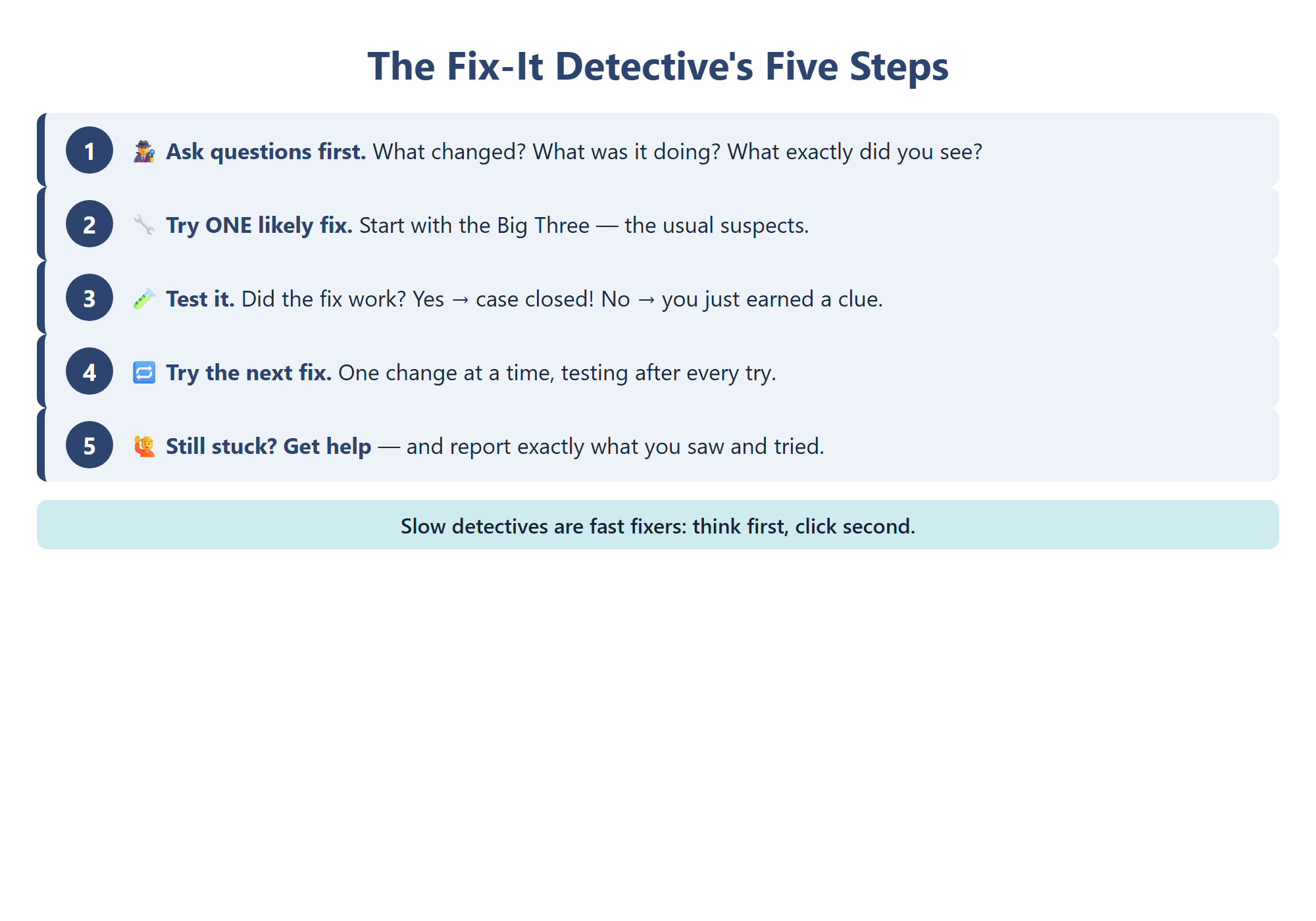
Section titled “The Five Detective Steps”Fix-It Detectives follow five steps, in order:
- Describe the problem. What exactly is happening?
- Guess the most likely cause, based on your clues.
- Test one thing. Try a single fix.
- Check the result. Did it work?
- Ask for help if the case is still unsolved.
Three Detective Questions
Section titled “Three Detective Questions”The worst thing to do with a frozen screen is panic-click fifty times. That is like a detective stomping all over the footprints. Instead, take a breath and ask:
- What changed? A new app? A dropped tablet? A moved router? Problems love to appear right after a change, so the change is your top suspect.
- What was it doing right before? Playing a video? Downloading a game? Sitting in a hot car?
- What exactly did you see? “It’s broken” is not evidenceevidence: Facts you can see or hear that help prove what happened, like a message on the screen or a sound the device made.. “The screen went black, but I can still hear the music” is evidence.
Read the Error Message
Section titled “Read the Error Message”If a message pops up, read it slowly. An error messageerror message: A message from the computer that tells you something went wrong, often with a clue about what it was. is the computer telling you what hurts: “No internet connection,” “Storage almost full,” or “Battery low.” Write it down exactly, word for word, even if some words are confusing. A grown-up or IT helper may know exactly what they mean. (If it is a scary pop-up asking you to call a number, remember Chapter 4: that is a scam, not an error message.)
5.2 — The Big Three Fixes 🔧
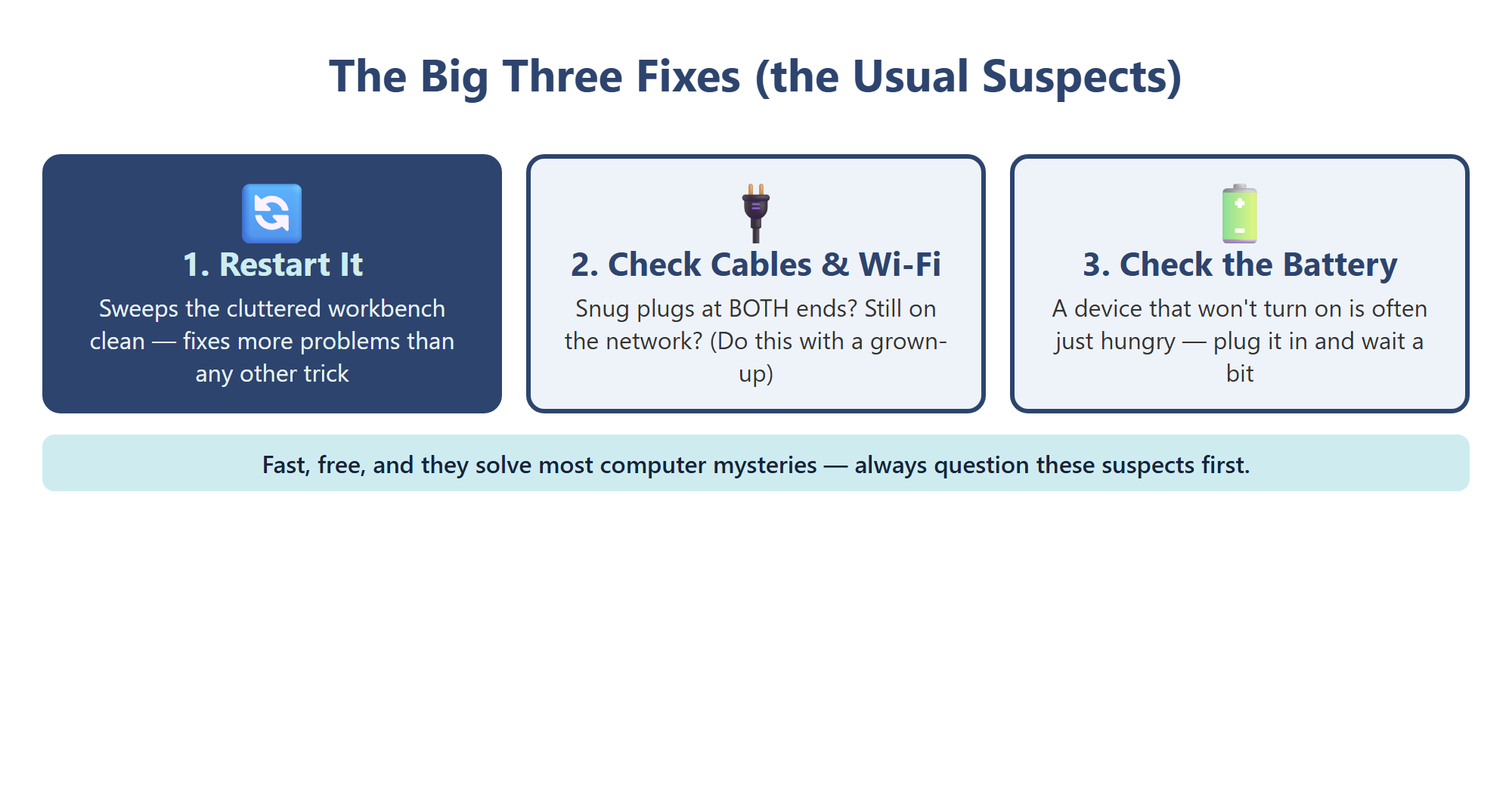
Section titled “5.2 — The Big Three Fixes 🔧”Real computer helpers say most everyday mysteries are solved by one of three simple fixes. We call them the Big Three. They are fast, free, and safe for you to try.
Fix 1: Restart It 🔄
Section titled “Fix 1: Restart It 🔄”After hours of use, the memory workbench gets cluttered with half-finished jobs. A restartrestart: Turning a device off and back on so memory clears and every program starts fresh. sweeps the bench clean and lets every program start fresh. Save your work first, then use the normal restart button or menu. It sounds too simple to work, but “turn it off and on again” fixes freezes and glitches more than any other trick.
Fix 2: Check the Cables and the Wi-Fi 🔌
Section titled “Fix 2: Check the Cables and the Wi-Fi 🔌”Connections love to wiggle loose. Is the cable snug at both ends? Is Wi-Fi turned on, and is the device connected to the right network? Here is a great detective trick: check whether other devices have the same problem. If every device in the house lost the internet, the problem probably lives in the router or the internet connection, not in your tablet. That is a job for a grown-up, who might restart the router.
Fix 3: Check the Battery 🔋
Section titled “Fix 3: Check the Battery 🔋”A device that won’t turn on is often just hungry. Plug in the charger, check that the outlet and cable work, and wait a few minutes. A completely empty battery may need a little while before the screen lights up.
Why the Usual Suspects Come First
Section titled “Why the Usual Suspects Come First”Why try these first? Because they solve most cases, and a detective always questions the usual suspects before hunting for anything fancy. Think about which fix matches your clues. A frozen screen points to a restart. A video that keeps spinning points to the Wi-Fi. A black screen that won’t wake up points to the battery. Your clues from section 5.1 tell you which suspect to question first, so you don’t waste time.
And if one of the Big Three works, notice which one. Next time the same thing happens, you will know exactly where to start.
5.3 — One Change at a Time 🧪
Section titled “5.3 — One Change at a Time 🧪”Imagine a detective who arrests five suspects at once and says, “Well, one of them probably did it!” That is a terrible detective. When you troubleshoot, every fix you try is a test, and every result is a clueclue: A piece of information that helps you get closer to solving a mystery.. But clues only work if you know which fix caused which result.
The Golden Rule: Change One Thing, Then Test
Section titled “The Golden Rule: Change One Thing, Then Test”- Restart the tablet. Test: does the video play now? No? Then the restart was not the answer.
- Reconnect to the Wi-Fi. Test: does it play now? Yes? Case closed, and now you know it was the Wi-Fi.
Now imagine you restarted, switched networks, plugged in the charger, and moved rooms all at once, and the video started working. Great, but why? You have no idea. Next time it happens, you have to try everything again. Worse, one of those changes might have caused a brand-new problem, and you won’t know which one.
After every test, give the device a moment. Some fixes, like reconnecting to Wi-Fi or charging a dead battery, take a minute to show results. A patient detective waits, then checks.
Failed Fixes Are Clues Too
Section titled “Failed Fixes Are Clues Too”Changing one thing at a time turns every try into a clue. “The restart didn’t fix it” sounds like bad news, but it is progress, because you just crossed a suspect off your list. Scientists work the same way. They change one thing in an experiment, watch what happens, and write it down.
Keep a Fix-It Log
Section titled “Keep a Fix-It Log”Real IT workers write down what they try. A simple log has three columns:
| What I Tried | What Happened | What It Tells Me |
|---|---|---|
| Restarted the tablet | Video still stopped | Not a memory problem |
| Checked my brother’s tablet | His video stopped too | The problem is probably the internet, not my tablet |
A log keeps you from repeating the same fix, and it becomes the perfect report if you need help. Slow detectives are fast fixers.
5.4 — Getting Help and IT Careers 🙋
Section titled “5.4 — Getting Help and IT Careers 🙋”Even the greatest detectives have partners. Asking for help is not giving up. It is a skill.
When to Call a Grown-Up
Section titled “When to Call a Grown-Up”- You have tried the Big Three and the mystery is still unsolved.
- The fix needs installing, deleting, settings, or opening anything.
- Anything involves passwords, money, buying things, or a message that might be a scam.
- The device is hot, cracked, swollen, smoking, sparking, or smells strange. Stop right away. That is not a kid case.
- You feel unsure. When in doubt, ask.
The Helper Report
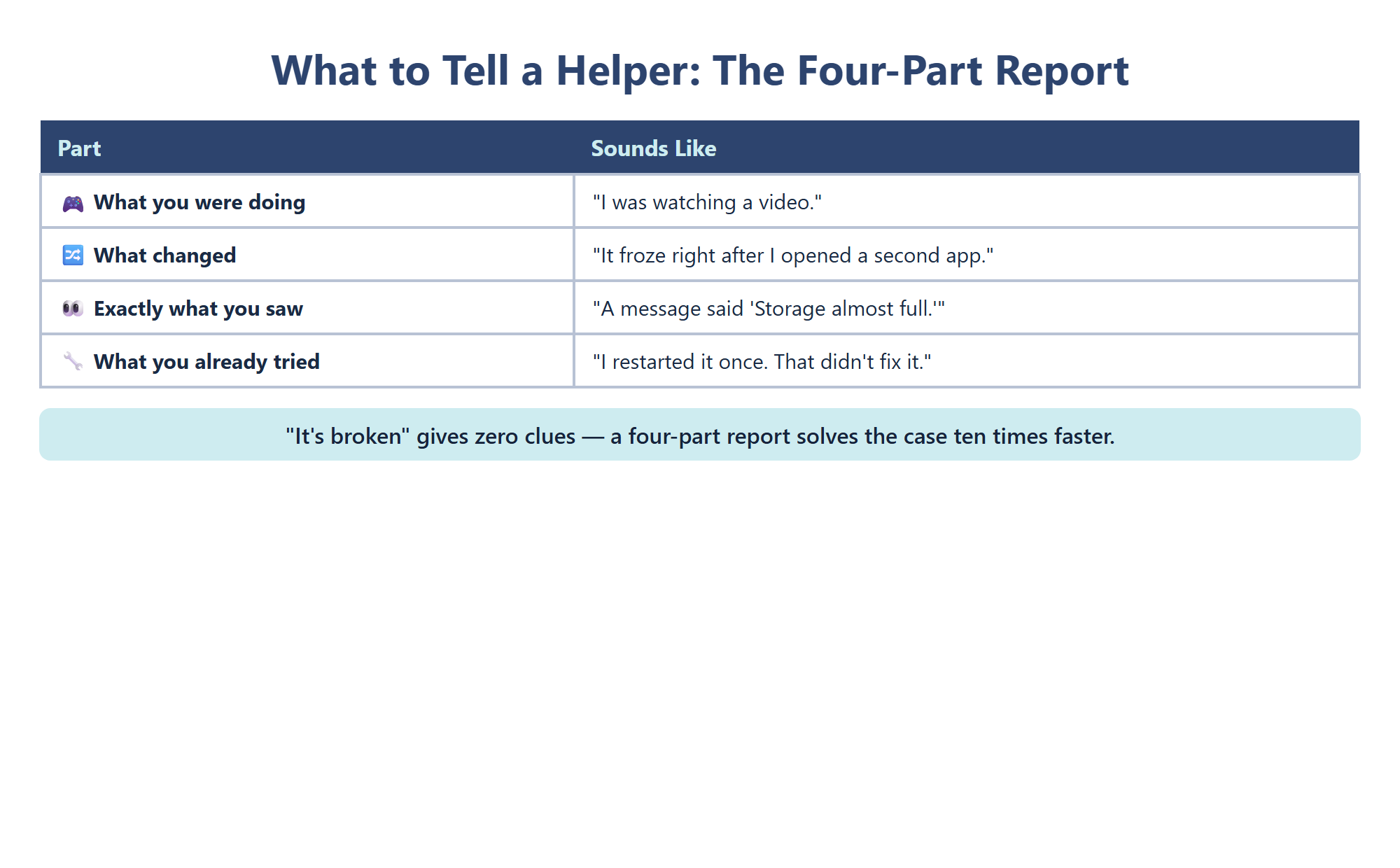
Section titled “The Helper Report”Don’t just say “it’s broken.” Hand over your evidence:
- What you were doing: “I was watching a video.”
- What changed: “It froze right after I opened a second app.”
- What you saw: “A message said ‘Storage almost full.’”
- What you tried: “I restarted it once. That didn’t fix it.”
A helper with a good report can skip the guessing and go straight to the right fix. A helper with “it’s broken” has to start the whole mystery over.
At school, your teacher may send that report to the IT department as a ticketticket: A written help request that an IT team uses to track a problem until it is fixed., a written request the team tracks until the problem is fixed.
People Who Fix Computers for a Living
Section titled “People Who Fix Computers for a Living”information technology (IT)information technology (IT): The work of setting up, connecting, protecting, and fixing computers and networks so people can use them. is the work of keeping computers and networks running. Every time a classroom tablet gets an update overnight, a new student gets a login, or the school Wi-Fi comes back after a storm, an IT worker probably made it happen. Schools, hospitals, stores, airports, and game companies all need IT teams:
- Help desk workers answer questions and solve problems by phone, chat, or in person.
- Computer technicians repair and set up devices.
- Network technicians install and care for routers, cables, and Wi-Fi.
They all use the steps you learned: describe, guess, test one thing, check, and ask for help. Great IT workers are also kind and patient, because the person with the broken computer is often worried. Explaining a fix in simple words, the way you have been practicing in this book, is part of the job. If you enjoyed being a Fix-It Detective, this could be the first chapter of your future job.
Chapter 5 Activity: Fix-It Detective Cases 🔍
Section titled “Chapter 5 Activity: Fix-It Detective Cases 🔍”Your Mission: Crack three cases. For each one, use the five detective steps, pick one Big Three Fix to try first, and fill in a fix-it log.
Part 1: The Case of the Dark Tablet
Section titled “Part 1: The Case of the Dark Tablet”Mia presses her tablet’s power button. Nothing happens. She says, “It worked this morning, but I played games on it all day at the park.” What changed? Which of the Big Three is your top suspect? Write your first test and how you will check it.
Part 2: The Case of the Spinning Video
Section titled “Part 2: The Case of the Spinning Video”Jayden’s video keeps stopping. His sister’s laptop in the next room is having the same problem at the same time. What does that clue tell you about where the problem lives? Which fix comes next, and who should do it?
Part 3: The Case of the Grumpy Game
Section titled “Part 3: The Case of the Grumpy Game”Grandpa’s phone worked great until yesterday, right after he installed three new apps. Now his favorite game is slow and keeps closing, and a message says “Storage almost full.” What changed? Write Grandpa a four-part helper report as if you were sending a ticket to an IT helper together.
Key Concepts Checklist
Section titled “Key Concepts Checklist”- I can explain what it means to troubleshoot
- I can list the five detective steps: describe, guess, test one thing, check, ask for help
- I ask what changed, what it was doing, and what I saw before touching anything
- I can name the Big Three Fixes: restart, check cables and Wi-Fi, check the battery
- I check other devices to find out where a problem lives
- I change one thing at a time and keep a fix-it log
- I know when to stop and get a grown-up, and I can write a four-part helper report
- I can name three IT jobs and what each one does